Know the fix before you leave the site.
Cell Signal Help gives approved Canadian SureCall installers model-specific, step-by-step guidance while the job is still in front of them. Ask from your phone, follow the next test and verify the result before you pack up.
Answers are grounded in approved SureCall sources, with citations.

From red LED to resolved, without leaving the site.
Describe the symptom. Cell Signal Help identifies the booster model, asks one focused question at a time and recommends the next physical test. The response changes as the evidence changes.

- Step 1Identify the modelModel and symptom1/4Red light on the booster and no signal inside the parkade.
Which booster is on site? The lights mean different things by model.
Force5 with SentryFusion Ultra 5GFusion Professional 5GForce5 with Sentry. - Step 2Observe the exact light conditionLight state and first isolation test2/4
Force5 with Sentry has one LED per band. Which one is red: LTE-A, LTE-V, CELLULAR, PCS or AWS?
AWS is red. POWER is green and the rest are amber.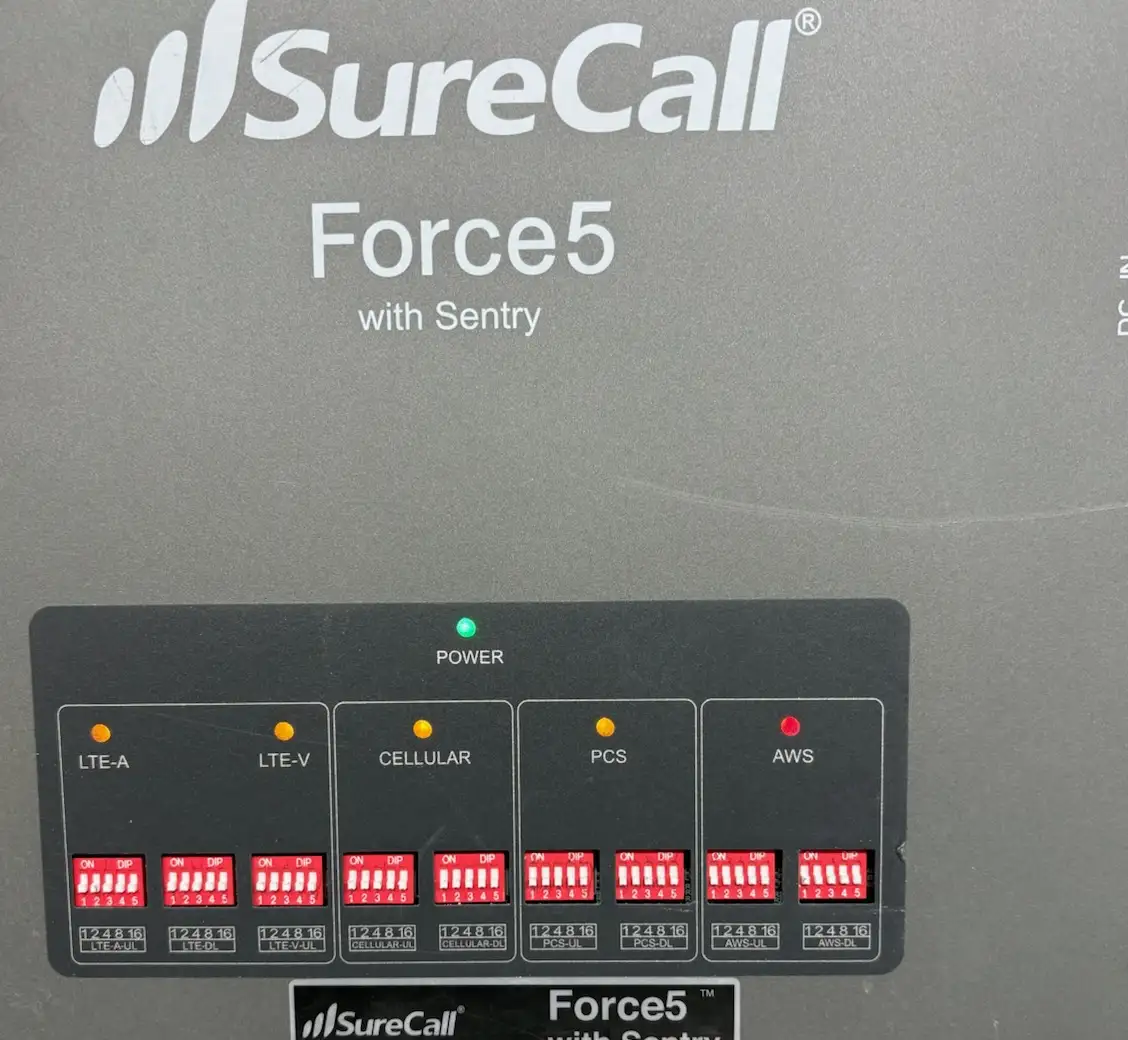
AWS red · POWER green AWS has shut that band down on its own; the unit still has power. Disconnect the outside/input (donor) and inside/output (server) leads at the booster, then power cycle it. What is the AWS LED doing now?
- Step 3Isolate with one controlled testEliminate the booster3/4AWS came up green with both leads off.
Then the booster is not faulted. AWS is reacting to what is on one of the two ports.
Reconnect the outside/input (donor) lead only. Leave the inside/output (server) lead off, power cycle, and give it a minute. Is AWS red again?
- Step 4Verify the result and the sourceOverdrive or oscillation4/4Still red with only the outside lead connected.ResultLikely overdrive
The AWS downlink reaching the booster is stronger than it can handle. Measure AWS downlink at the donor lead and bring it inside the approved range before the inside/output lead goes back on.
Open source →03 Troubleshooting Field LogicApproved · SureCall · Force5 / AWS bandIf AWS had cleared with the server lead off, the branch is likely oscillation and antenna separation: separation and donor aim, not attenuation.
What lights are showing now?

Swipe for the next stage →
Finish more jobs right the first time.
Use Cell Signal Help while the antennas, booster and cable path are still accessible. It helps you move from symptom to controlled test to verified correction, without replacing field judgement.

- Model-specific guidance
- The answer changes with the booster. Nothing is interpreted before the model is known.
- One test at a time
- No overloaded troubleshooting lists. One question or one physical action, then the next.
- Photo-supported diagnosis
- Show the equipment and the light condition, and work from what is actually in front of you.
- Clear handoff
- Escalate when the issue needs design or engineering support, with the right information attached.

Know which jobs fit, and which need design support.
Before quoting, or while preparing for the site visit, use Cell Signal Help to collect the signal, building and application details that determine the next step. Straightforward jobs move forward. Complex RF environments are escalated with the right information attached.
- Carrier and coverage requirement
- Building size and construction
- Roof signal or field-test readings
- Likely donor direction
- Target booster class
- Conditions requiring design support
When the job is outside the supported rule set, Cell Signal Help identifies what is missing and routes you to the correct design or technical contact.
Good to know.
Is Cell Signal Help available outside Canada?
No. The beta is intended for approved Canadian SureCall installers and related channel partners.
Who can get access?
Access is provisioned by hand during the beta. There is no self-serve signup.
Does it replace an RF designer or SureCall technical support?
No. It supports field decisions and job qualification. Complex designs, unusual RF environments and unsupported conditions are escalated.
Can I trust the answer?
Each answer cites the approved source used. You can open the source before you act on it.
Will it recommend products?
Only where approved SureCall material supports the recommendation. It does not substitute unsupported product advice.
Built around the systems Canadian installers actually support.
Initial beta content is centred on SureCall systems commonly deployed in Canada, plus the antennas, diplexers, splitters and installation practices around them. Support expands as approved Canadian content is added and validated.


For approved SureCall installers across Canada.
Answers you can check.
Each technical response displays the approved source document and the relevant page or section. When the approved material does not support a confident answer, Cell Signal Help says so and directs you to the correct escalation path.
- Cited
- Every answer
- Approved
- Sources only
- Canada
- Start to finish
- Human
- Escalation path

Take the next field question with you.
Request beta access and use Cell Signal Help from your phone when the equipment, measurements and site conditions are still in front of you.